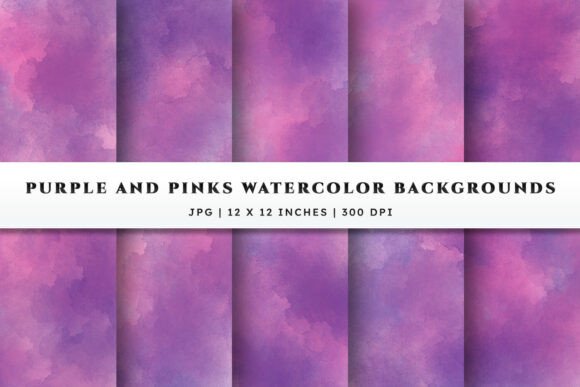
Elevate Your Designs with Watercolor Backgrounds - Purple Pinks
There is a distinct magic in the way watercolor bleeds and blends, creating soft edges and dreamy gradients that digital filters often struggle to replicate authentically. When you are looking to infuse your creative projects with a sense of romance and elegance, Watercolor Backgrounds - Purple Pinks offer a sophisticated solution. This collection is not just about color; it is about texture, depth, and the tangible feel of art on paper. Whether you are a seasoned graphic designer, a small business owner crafting brand assets, or a hobbyist using Cricut and Silhouette machines for home decor, understanding how to select and utilize these textures correctly can make the difference between a project that looks amateurish and one that exudes professional polish.
The appeal of this specific set lies in its balanced palette. Purple and pink are historically linked to creativity, luxury, and tenderness. However, many creators make the mistake of assuming any purple or pink image will work as a background. The reality is that poorly chosen backgrounds can clash with text, obscure important design elements, or look pixelated when printed. The Watercolor Backgrounds - Purple Pinks set addresses these issues by providing high-resolution files specifically engineered with realistic watercolor paper texture and smooth washes. By starting with a foundation designed for versatility, you avoid the common pitfall of forcing a low-quality image to fit a high-stakes project.
Avoiding the Resolution Trap in Print Projects
One of the most frequent errors creators make involves overlooking file resolution until it is too late. You might find a beautiful purple gradient online, download it, and place it into your invitation layout, only to discover jagged edges and blurriness once you hit "print." This happens because screen resolution (72 DPI) is vastly different from print resolution (300 DPI). When you use standard web images for physical products like stickers, labels, or greeting cards, the result is often disappointing and unusable, wasting both time and materials.
To ensure your output remains crisp and professional, you must verify the specifications before you begin designing. The Watercolor Backgrounds - Purple Pinks set is delivered at 300 DPI, which is the industry standard for high-quality printing. Each background spans 12 × 12 inches, providing ample space for full-bleed designs without stretching the image. Before committing to a design path, always check that your source files match your intended output size. If you are creating a large poster or a detailed scrapbook page, starting with a high-quality JPG ensures that the gentle gradients and realistic paper texture remain smooth, preserving the soft watercolor finish that defines this aesthetic.
Misunderstanding Texture and Layering
Another common misunderstanding is treating watercolor backgrounds as flat blocks of color. True watercolor art has depth; it has areas where the pigment pools and areas where the paper shows through. A frequent mistake among beginners is placing busy text or complex graphics directly over the darkest or most saturated parts of the watercolor wash. This reduces readability and muddies the visual hierarchy of your design.
A better approach is to treat the background as a foundational layer that supports, rather than competes with, your foreground elements. Because these purple and pink watercolor backgrounds feature blended hues and gentle transitions, they are ideal for overlaying white or light-colored typography. If you find a specific area of the background too dark for your text, consider adding a subtle semi-transparent shape behind the text or adjusting the opacity of the text box itself. This technique maintains the romantic, dreamy vibe of the background while ensuring your message is clear. Remember, the goal is to enhance the presentation, not to let the background overpower the content.
Optimizing for Digital and Physical Use
Creators often segment their workflows, thinking separately about digital marketing and physical crafts. However, the most efficient designers choose assets that bridge both worlds. A common inefficiency occurs when a creator buys one set of images for social media and a completely different set for printing. This fragments your brand identity and increases costs.
The Watercolor Backgrounds - Purple Pinks collection is versatile enough to serve both needs simultaneously. Since the files are high-resolution JPGs, they scale down beautifully for digital use on blogs, Instagram stories, or email headers without losing quality, yet they retain the detail necessary for printable textures. For Cricut and Silhouette users, this means you can design a sticker sheet on your computer, print it on high-quality cardstock using these backgrounds, and cut it with precision, knowing the colors will match your digital mockup. This consistency strengthens your branding across all touchpoints, from your website banner to the packaging of your handmade goods.
Practical Steps for Seamless Integration
Integrating new assets into your workflow should be straightforward, yet technical hiccups often cause unnecessary frustration. A simple but often overlooked step is proper file management. These backgrounds typically come compressed in a ZIP file to facilitate easy downloading. Failing to extract these files correctly before attempting to open them in design software like Photoshop, Canva, or Illustrator can lead to error messages and confusion.
Here is a practical checklist to ensure you get the most out of your purchase:
- Extract Immediately: As soon as you download the ZIP file, extract all contents to a dedicated folder on your computer. Do not try to drag images directly from the compressed folder into your design software, as this can sometimes cause linking errors.
- Verify Dimensions: Open one file to confirm it meets the 12 × 12 inch specification. This gives you a clear canvas to work with, whether you are trimming it down for a business card or using the full size for a scrapbook layout.
- Test Print: Before running a large batch of invitations or labels, print a single test sheet on your intended paper stock. This allows you to see how the purple and pink hues interact with your specific printer and paper type, ensuring the soft finish translates perfectly to the physical medium.
- Organize by Project: If you are working on multiple clients or personal projects, copy the specific background you intend to use into that project's folder. This prevents accidental overwrites and keeps your workflow tidy.
By paying attention to these details, you transform a simple download into a powerful tool for your creative arsenal. The Watercolor Backgrounds - Purple Pinks set is designed to be user-friendly, but the quality of your final output ultimately depends on how well you prepare and apply these resources. Whether you are branding a new boutique, creating wedding invitations, or simply adding a touch of whimsy to your planner, taking the time to understand resolution, layering, and file management will yield results that look polished and intentional.
In a market saturated with generic digital papers, choosing a set that offers genuine texture and thoughtful color blending sets your work apart. Avoid the temptation to rush the setup phase. Instead, embrace the process of selecting the right hue, checking the resolution, and layering your design with care. When you do, the soft, romantic touch of these watercolor backgrounds will shine through, elevating every project you touch from ordinary to extraordinary.